Security Platform
Cosinium OS
The firewall operating system that protects your network: at home, in the office, in the cloud, on your development workstation and wherever you take it.
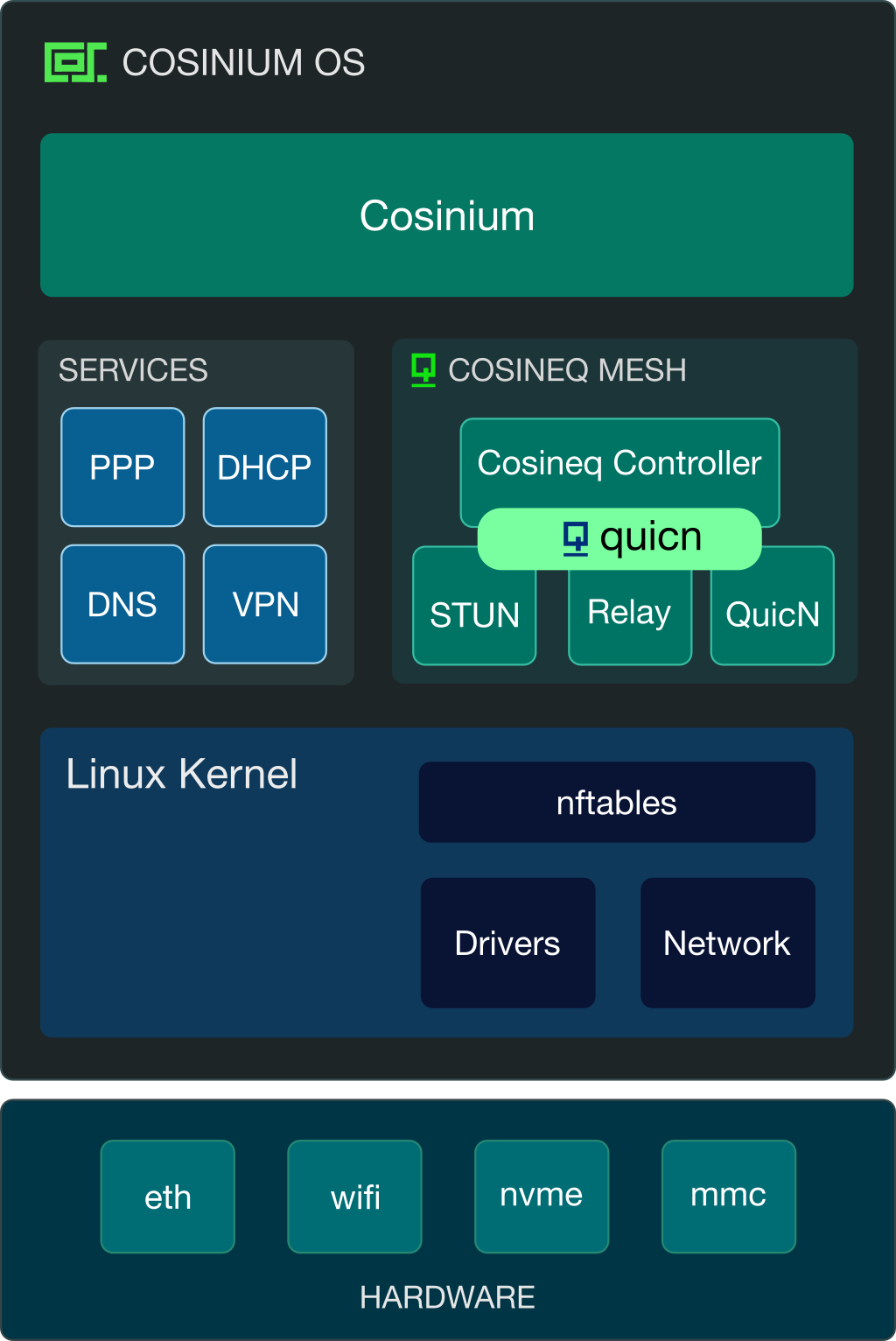
Cosinium OS is the foundation that all our products align to. It is a lean image-based operating system, meaning it is self-contained and there is no installer; write the image, power on, answer a few brief questions, and it's ready! There are no packages to install because that often leads to compatibility issues or a broken system. Every program we ship with Cosinium must have a good reason to exist, and if it does, it carries a complete lifecycle: configuration, testing and use.
Cosinium - the one operating system for the box at the edge of your network, whether that box is a pocket appliance, a rack server, a cloud instance or a container on a host you already run. They all run with the same configuration model, provide the same API and can be upgraded in the same way.
Downloads
Cosinium OS and Cosineq controller and mesh VPN clients are available for download at downloads.cosinium.com. Test out the images in an isolated VM or container and see what Cosinium and Cosineq can do. Email us at info@cosinium.com to obtain a license to extend their use.
What does Cosinium need?
Cosinium is a lightweight image that can be written to bootable storage of 8GB minimum, although we recommend 16GB or more for flash media when logs and telemetry are enabled. Runtime requires a minimum of 2 CPU cores and 1GiB memory. When using address or block lists, we recommend 4 CPU cores and 2GiB memory. Size your system according to your needs.
Firewall
Linux based firewall with atomic configuration reload.
- Chains and Zones
- nftables interface and VPN rulesets that can include common and zone rule lists. Everything continues to work when replacing network interfaces. A graphical ruleset map tool lets you query the path that a packet takes through the kernel.
- Load balancing, NAT, port forwarding
- Distribute inbound connections across a backend pool of services, mask your network hosts, or port forward inbound connections.
- Threat blocking
- Apply address lists from feeds that include threat intelligence, geography, or your own to firewall and DNS rules. One-click blocking from persistent intruders and their network within the UI.
- High-availability
- Deploy Cosinium as an active-passive HA setup to maintain your network connection stability. A post-quantum QuicN connection is used as a synchronisation channel between the pair and ensures secure isolation from other traffic on that segment.
- Tuning for improved throughput
- Kernel features are tuned to improve network throughput specific to the hardware platform so you don't have to apply manual workarounds.
- Transparent TLS inspection
- Capture, review, and block TLS (including QUIC) traffic passing through Cosinium. This capability is enforced in Cosinium's AppSec feature to gate AI workloads. Note: this requires a root certificate to be installed on the host to be inspected.
DNS
Cosinium odns - a high peformance, low memory DNS resolver written in Odin.
- Block list filtering
- Schedule downloading of address list feeds, including preset categories for you to pick and choose what you want, such as security threats, malware, ads, and adult content sites. odns uses 80MB of memory to load in a 2.5 million entry set, in under 3 seconds on a small ARM Cortex-A55 based NanoPi R5C
- Active-active high availability
- Create a pair of DNS servers in an active-active setup with a secure channel between them.
- Policy routing by domain name or organisation ASN
- Send a domain or organisation-owned IP address set (part of their Autonomous System Numbers) out of a chosen network path: an internet provider uplink, VPN tunnel, or specific gateway. Using an organisation's ASN dataset means no DNS capture is required and catches traffic that didn't query DNS.
- Dynamic DNS for any provider
- IPv4 and IPv6 DDNS updates using HTTP; Cloudflare, No-IP, Route 53 and anything else.
- More than split-horizon
- Configure each network to use a different upstream service. DNS isolation to block one network from seeing answers for another. Remap responses to alternative addresses.
- Other features
- DNS over TLS/HTTPS/QUIC. DNSSEC validation. Query and blocking statistics.
Connectivity
- PPPoE eXpress Path
- Cosinium's own high performance PPPoE implementation, delivering 2.5x more upload/3x more download than the Linux kernel (33Gbps vs 10Gbps). Firewall security is still enforced to protect your network.
- End to end IPv6
- IPv6 internet access ready with automated configuration and live changes detected. Cosinium's dhcpc-rs integrates tightly with our network interface management and facilitates the wide variety of IPv6 features and options that come from service providers, including slicing prefix delegation ranges.
- Live tracking of network interfaces
- Anything that changes on a network interface is immediately detected: link, carrier, address, PPP and express-path changes are visible to you.
- Choice of VPN stacks
- QuicN, OpenVPN, IPsec/IKEv2 and WireGuard with profile import and certificate issuing. All four integrate into the firewall VPN rules.
Operations
- Signed images that are verified at download and activation
- Cosinium upgrade images are securely signed to prevent image tampering. Additionally, image extraction at next-boot activation checks the existence of every file in them.
- 2 OS layers and A/B boot slots with automatic rollback
- Cosinium OS consists of an outer host filesystem that handles the hardware boot stage and an inner image that runs the business logic. Recovery is available on a failed boot.
- Uninterrupted streaming during warm restart
- Restarting without a complete kernel reboot enables fast bringup to reduce any downtime, in fact your streaming continues uninterrupted. A full power reboot is under 30 seconds from BIOS/firmware POST.
- Every change is reversible
- Each subsystem keeps a patch log beside its configuration and enables rolling back N-steps to reverse every change across all of them at once. Configuration rollback can be applied even when running a newly updated image.
- Snapshots, backup and cross-system import
- Take a full-system snapshot whenever you want one. Schedule fully encrypted backups and upload them to your own server. Restore the whole configuration from it, or import selected parts.
- An API, a web UI and a CLI
- JSON-based RPC API over HTTP, as used by the web UI and shell is also
what you can use to implement your own automation. Two request forms
with role-based entitlements:
GETto read,POSTto add/change/delete. Cosinium's CLI provides an interactive shell or one-shot command line requests.